# How to find your computer name on Windows or macOS
## How to find your computer's name in Windows 10 or Windows 11
On Windows computers, you'll need to open the "About" menu to find — and change — your computer's name.
**1.** On your Windows PC keyboard, press **the Windows key + I** to open the Settings app.
**2.** Click the **System** option in the top-left part of the Settings page.
**3.** Scroll down to the bottom of the System menu and select **About**.
Your computer's name will be listed next to **Device Name**. You'll also be able to find your PC's serial number and model name on this page.

This page lists all of your PC's basic identifying information*. Microsoft; William Antonelli/Insider*
If you want to give your computer a new name, click the **Rename this PC** option.
## How to find your computer's name on a Mac
You'll find your Mac's name in the "Sharing" menu. [You can change it from this menu too](https://www.businessinsider.com/how-to-change-mac-name).
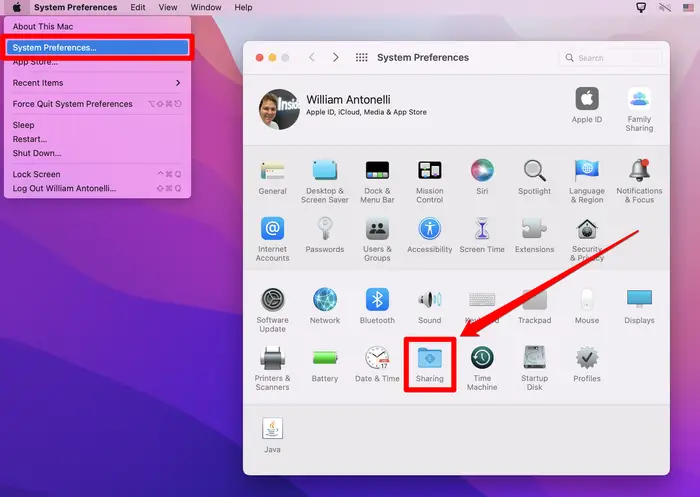
**1.** Click **the Apple icon** in the top-left corner of your Mac's screen, and then click **System Preferences**.
**2.** Near the bottom of the System Preferences menu, click **Sharing**. Its icon looks like a blue folder.
[](https://docs.gamma.tech/uploads/images/gallery/2022-09/1FcT19VfN4LwRQJt-62e9407957dd3c0018dc05a6.webp)
**Open the sharing menu***. Apple; William Antonelli/Insider*
You'll find your Mac's name in the **Computer Name** text field at the top. You can click inside this field to edit the name however you want.
[Original Source: William Antonelli - Business Insider](https://www.businessinsider.com/guides/tech/how-to-find-computer-name)